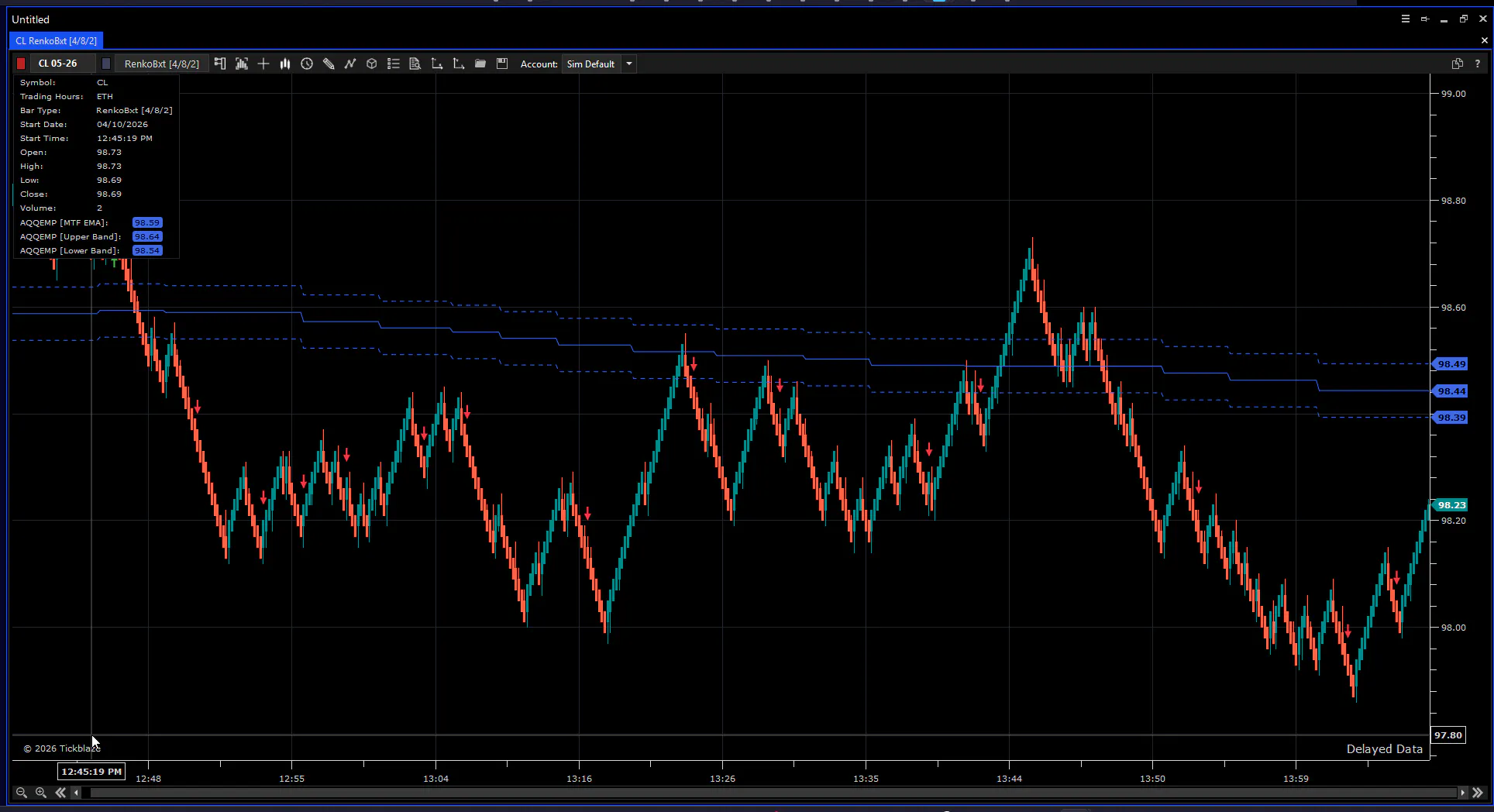
This is a signal system — an indicator that essentially functions as a trading system signal engine.
All the signals you see on the chart and receive can be used and are available for your trading systems.
By adjusting the settings, you can tailor the signals to your specific chart type.
Be careful: Renko settings must differ in order to produce high-quality signals. Everything is described in detail in the documentation. Study the documentation. I am waiting for your feedback.
there's a new updated version just released with improvements:
The old ATR filter (fixed tick threshold, hard to calibrate) was replaced with an ATR Ratio filter — compares current ATR vs its own long-term average, works universally across ES/NQ/CL and any timeframe without manual tuning
Memory leak fix in swing detection (O(1) instead of growing HashSet)
# AntoQQE Modern Plus — Technical Reference
Type: Overlay Indicator | Platform: Tickblaze | No-repaint: Yes
---
## Overview
AntoQQE Modern Plus is an extended signal engine built on top of AntoQQE Modern. It uses QQE (Quantitative Qualitative Estimation) as the core directional engine, layered with up to 6 configurable filters. Beyond visual arrows, it outputs ATR-based stop and target price levels readable by external strategies.
---
## Signal Logic
Base signal — QQE flip (no-repaint):
```
Long signal: QQE trend flipped to +1 on bar [i−1] (was not +1 on [i−2])
Short signal: QQE trend flipped to −1 on bar [i−1]
```
All filter checks use Close[i−1] and confirmed closed bars only. The signal never changes after the bar closes.
---
## Filter Chain
Filters are applied in sequence. Any single failure blocks the signal.
### Filter 1 — MTF EMA Direction + Buffer (always active)
Requires price to be on the correct side of the higher-timeframe EMA with a configurable dead zone:
```
Long: Close[i−1] > EMA(TrendTimeframe, TrendEmaPeriod) + Buffer
Short: Close[i−1] < EMA(TrendTimeframe, TrendEmaPeriod) − Buffer
```
### Filter 2 — MTF EMA Slope (optional)
Requires the higher-timeframe EMA to be actively moving in the signal direction:
```
Long: EMA[now] > EMA[prev] + SlopeMin ticks
Short: EMA[now] < EMA[prev] − SlopeMin ticks
```
### Filter 3 — Swing Structure (optional)
Tracks confirmed swing highs and lows on the current chart. Requires micro-trend structure to align with the signal direction:
```
Long: last confirmed swing high = HH AND last confirmed swing low = HL
Short: last confirmed swing high = LH AND last confirmed swing low = LL
```
Bypassed automatically until at least 2 swings of each type are observed (early-bar safety). Swing confirmed after SwingStrength bars on both sides — no repaint.
### Filter 4 — Momentum Trigger (optional)
Requires short-term momentum to confirm direction:
```
Long: Close[i−1] > Close[i−1−MomentumBars]
Short: Close[i−1] < Close[i−1−MomentumBars]
```
> ⚠ Not effective on Renko charts — every Renko brick is already a directional breakout. Use on time-based charts only.
### Filter 5 — ATR Regime (optional)
Skips signals when the market is compressed or inactive:
```
Signal blocked if: ATR(AtrPeriod)[i−1] < AtrMinTicks × TickSize
```
### Filter 6 — Cooldown (optional)
Enforces a minimum gap between consecutive signals. Prevents cluster entries in fast-moving conditions:
```
Signal blocked if: (current bar − last signal bar) < CooldownBars
Set CooldownBars = 0 to disable.
```
---
## Risk Output Plots
When a signal fires, two hidden plots are populated for strategy consumption:
| Plot | Value | Description |
|---|---|---|
| StopPrice | Close[i−1] ± ATR × StopAtrMultiple | Absolute stop level |
| TargetPrice | Entry ± StopDist × RiskRewardRatio | Absolute target level |
Both plots output NaN when there is no signal. Entry reference is always Close[i−1] (the QQE flip bar).
Strategy usage:
```csharp
double sig = _ind.Signal[index]; // 1 / -1 / 0
double stop = _ind.StopPrice[index]; // absolute price
double target = _ind.TargetPrice[index]; // absolute price
```
---
## Visual Plots
| Plot | Visible | Description |
|---|---|---|
| Arrows (OnRender) | Yes | Up arrow = long signal, down arrow = short signal |
| MTF EMA | Yes | Higher-timeframe EMA line |
| Upper / Lower Band | Yes | EMA ± buffer zone (dead zone boundary) |
| Signal | Hidden | Numeric signal value for strategy reading |
| StopPrice | Hidden | ATR-based stop level |
| TargetPrice | Hidden | ATR-based target level |
---
## Parameters
| Parameter | Default | Description |
|---|---|---|
| RSI Period | 14 | QQE base RSI period |
| SF | 5 | RSI smoothing factor |
| QQE Factor | 4.238 | QQE trailing band multiplier |
| Trend Timeframe (min) | 5 | Higher timeframe for EMA filter |
| Trend EMA Period | 50 | EMA period on the trend timeframe |
| Buffer (ticks) | 5 | Dead zone half-width around EMA |
| Use Slope Filter | true | Enable MTF EMA slope requirement |
| Slope Min (ticks) | 1 | Minimum EMA move per bar to qualify |
| Use Swing Filter | true | Enable swing structure requirement |
| Swing Strength | 2 | Bars each side for swing confirmation |
| Use Momentum Trigger | false | Enable momentum gate |
| Momentum Bars | 3 | Lookback for momentum comparison |
| Use ATR Filter | false | Enable ATR minimum regime filter |
| ATR Period | 14 | ATR lookback period |
| ATR Min (ticks) | 10 | Minimum ATR to allow entry |
| Cooldown Bars | 0 | Minimum bars between signals (0 = off) |
| Stop ATR Multiple | 1.5 | Stop distance = ATR × this |
| Risk/Reward Ratio | 2.0 | Target = stop distance × this |
---
## Chart Type Guide
The right filter combination depends on the chart type. Some filters are effective on Renko, others only make sense on time-based charts.
### Renko Charts (OpenProRenko, BetterRenko)
| Filter | Use | Notes |
|---|---|---|
| MTF EMA + Buffer | ✅ Always | Core filter, works on any chart type |
| Slope Filter | ✅ Recommended | EMA slope is meaningful on Renko |
| Swing Filter | ✅ Recommended | SwingStrength=2 works cleanly — Renko removes noise, swing points are clear |
| Momentum Trigger | ❌ Do not use | Every up-brick closes above the previous high by definition. The trigger is always true and adds nothing |
| ATR Filter | ⚠ Optional | ATR on Renko is relatively stable (brick size is fixed). Only useful to filter low-activity periods |
| Cooldown | ✅ Useful | Prevents re-entry on rapid consecutive bricks after a strong move |
Recommended Renko setup:
```
Use Slope Filter: true
Use Swing Filter: true (SwingStrength = 2)
Use Momentum Trigger: false
Use ATR Filter: false
Cooldown Bars: 3–5
```
---
### Minute / Time-Based Charts (1m, 5m, 15m, etc.)
| Filter | Use | Notes |
|---|---|---|
| MTF EMA + Buffer | ✅ Always | Core filter, works on any chart type |
| Slope Filter | ✅ Recommended | Filters flat EMA periods common on time-based charts |
| Swing Filter | ✅ Optional | Increase SwingStrength to 3 — minute charts are noisier, small swings are less reliable |
| Momentum Trigger | ✅ Useful | Close[i−1] > Close[i−1−N] is meaningful on time bars — price direction over N candles is a real signal |
| ATR Filter | ✅ Recommended | Very useful to block overnight/pre-market dead hours when ATR drops sharply |
| Cooldown | ✅ Useful | Prevents cluster signals during volatile news bars |
Recommended minute chart setup:
```
Use Slope Filter: true
Use Swing Filter: optional (SwingStrength = 3)
Use Momentum Trigger: true (MomentumBars = 3–5)
Use ATR Filter: true (AtrMinTicks = instrument-specific)
Cooldown Bars: 5–10
```
> Note: Do not enable Swing Filter and Momentum Trigger simultaneously as a starting point — each individually reduces signal count significantly. Add one, validate, then consider adding the second.
---
## Recommended Usage
Start with all optional filters off and compare signal frequency to AntoQQE Classic. Enable filters one at a time to understand the impact of each:
1. Enable Slope Filter → observe reduction in counter-trend noise
2. Enable Swing Filter → observe structural quality improvement
3. Enable Momentum Trigger (time-based charts only) → observe timing refinement
Running all filters simultaneously will produce very few signals. Recommended approach: use 2 filters maximum for normal trading, add a third only after validating on sufficient history.